01What Is Claude Agent OS and How It Works
Claude agent OS is a system where multiple AI agents work together 24/7 to handle tasks like note-taking, content creation, and monitoring news. Julian Goldie built it as a central hub that connects agents like Claude, Hermes, and Antigravity.
It links to a memory system using Obsidian, which is free and open source. This memory stores all context ahead of time, so you don't need to retrain models or plug in new prompts manually. The system runs in the background while you do other things, and it automatically updates notes and links everything in a knowledge graph.
02Main Features of Claude Agent OS
Claude Agent OS includes several built-in features that help automate your work. Here are the key ones:
- Memory system: Uses Obsidian to store notes and context automatically.
- Voice agent (Hermes Apollo): A real-time voice agent you can talk to, and it talks back.
- Wall mode: Displays everything on a monitor, ready for voice activation with a wake word like "Hey Hermes."
- Hermes Oracle: Pulls the latest news every 24 hours and helps create social media or SEO content.
- Hermes Astros: Monitors competitors and keywords, giving six new content ideas daily.
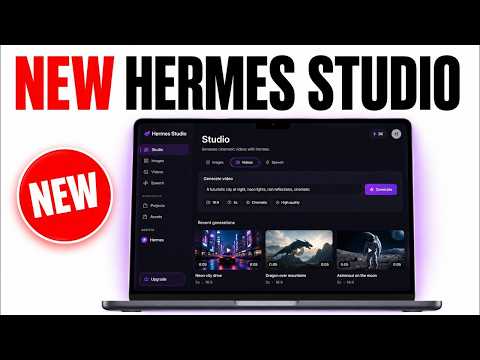
- Studio: Generates videos, voice notes, and images using tools like Minimax or Grok.
- Mixture of Agents: Combines multiple models for better performance.
This system was fully built with Claude, and you can add new models easily without breaking existing automations.
03How to Set Up Claude Agent OS
Setting up Claude Agent OS is simpler than it sounds. Julian shows that you don't need to be technical—he can't write HTML or code. Here's the process:
- Start with a free Obsidian vault for your memory system.
- Plug in your existing CLIs, like Claude Code or Antigravity CLI, to save costs.
- Add free APIs for models like DeepSeek when available.
- Build custom workflows using Claude or your preferred agent—just say "build this" and iterate.
- Connect agents like Hermes, Antigravity, and Claude to share the same memory and context.
- Set up a mission control dashboard to see the status of each agent.
- Test and improve the system daily—Julian spends 3-4 hours refining his.
You can also get Julian's pre-built version from AI Profit Board if you want a faster start.
04How to Use Claude Agent OS in Daily Work
Once set up, the system runs on its own. For example, you can say "Hey Hermes" to activate the voice agent, then ask it to create a new idea for an app. The agents will jump in, and if something useful comes out, they'll note it and add it to your pipeline.
For content creation, Hermes Oracle pulls trending news every 24 hours. You click once to create social media posts or SEO articles. Hermes Astros gives six personalized ideas daily, with unique titles and angles that you can send to your video agent or Notebook LM.
The studio lets you generate videos, images, and voice notes. Julian showed a video about Minimax H3 that was fully automated—AI avatar, B-roll, voiceover, and editing.
You can also build new features on the spot, like integrating Higgs Field for a film studio. Just tell Claude to build it, test it, and iterate.
05Results and Benefits Shown in the Episode
Julian shared several concrete results from using Claude Agent OS. For instance, the system takes notes automatically even when he's offline, linking them into the knowledge graph so agents understand context.
He also showed that before a new Claude model launches, it's already plugged in and ready, like Claude Opus 5. The system improves with each new model instead of falling behind.
The main benefit is saving time by not switching between tools that don't sync. Everything is in one place, so you don't lose files or projects. Julian also mentioned that he can use free APIs and existing subscriptions, so it costs him nothing extra.
Within his community, members like Kareem built their own mission control, and Andrea called it a game changer. These results show that even non-technical users can achieve real automation.
06Tips, Limits, and Mistakes to Avoid
To get the most from Claude Agent OS, focus on your daily tasks. Julian advises timing what you work on and listing repeatable tasks—then automate those.
One common mistake is thinking you need to be technical. You don't—just use Claude or another agent to build for you. Test and iterate often.
Be careful with costs. The good news is you can plug in free APIs and CLIs you already have, so you don't pay extra. But make sure to replace old models quickly to keep everything running smoothly.
Another limit is that you need to spend time improving the system daily. Julian invests 3-4 hours each day to make it better. If you skip this, the system won't grow with you.
Also, keep your mission control updated so you can see what each agent is doing, and don't forget to back up your Obsidian memory.
07Who Should Use Claude Agent OS and Why It Matters
Claude Agent OS is for anyone who wants to automate their work, especially non-technical people. Julian is not technical at all, yet he built and uses this system daily.
It matters because it lets you connect all your tools and agents into one place, saving massive time and keeping context. You never fall behind on industry news or model updates.
If you spend a lot of time on video, you can automate that. If you do SEO, you can automate content. The system is personalized to your keywords, competitors, and goals.
Even if you use AI Profit Board, the principles apply to any setup. Building your own agent OS puts you in control and helps you scale your work.