China's MiniMax M3 AI Changed Everything
watch the video
listen on apple podcasts
play the audio
Hermes Agent OS: The Mission Control Dashboard for AI Agents (10x Better Than Terminals)
The script showcases Hermes Agent OS as a mission control center for managing and automating AI agents with a unified, visual dashboard. It contrasts the typical terminal-based Hermes workflow—hard to control, organize, and preview past work—with an Agentic OS interface that lets users preview creations, manage tools and skills, connect MCPs in one click, track agent status, and use a Kanban board to assign missions to teams of agents. The system supports building apps and agency tools, generating and previewing videos via built-in skills, and operating connected assets like NotebookLM, while maintaining persistent history and a local memory/knowledge-graph layer synced with an Obsidian vault. It emphasizes avoiding scattered tabs and context re-explaining, and highlights the system’s ability to evolve by quickly adding new models and workflows.
00:00 Hermes Agent OS Overview
00:49 Terminal vs Dashboard
01:40 Kanban and Integrations
03:05 Video Creation Workflow
03:47 Memory and Knowledge Graph
04:55 Old Way Problems
05:49 Evolving Custom Workflows
07:56 One Dashboard Architecture
08:25 Free APIs and Smarter Agents
09:02 Get the Setup and Community
09:44 Wrap Up
The script showcases Hermes Agent OS as a mission control center for managing and automating AI agents with a unified, visual dashboard. It contrasts the typical terminal-based Hermes workflow—hard to control, organize, and preview past work—with an Agentic OS interface that lets users preview creations, manage tools and skills, connect MCPs in one click, track agent status, and use a Kanban board to assign missions to teams of agents. The system supports building apps and agency tools, generating and previewing videos via built-in skills, and operating connected assets like NotebookLM, while maintaining persistent history and a local memory/knowledge-graph layer synced with an Obsidian vault. It emphasizes avoiding scattered tabs and context re-explaining, and highlights the system’s ability to evolve by quickly adding new models and workflows.
00:00 Hermes Agent OS Overview
00:49 Terminal vs Dashboard
01:40 Kanban and Integrations
03:05 Video Creation Workflow
03:47 Memory and Knowledge Graph
04:55 Old Way Problems
05:49 Evolving Custom Workflows
07:56 One Dashboard Architecture
08:25 Free APIs and Smarter Agents
09:02 Get the Setup and Community
09:44 Wrap Up
Full transcript
Hermes AgentOS is absolutely insane. So this is a powerful mission control center that you can use to control your agents to get anything done and automate almost anything. So as an example of that, we check out some examples of what we've built here. We can preview everything that we've created.
We can create tools. We can create even like flashcard apps, et cetera. We can even build out tools for my agency. And not only that, but we can also generate videos and Hermes has a free agent for creating videos built directly inside its skillset.
Now, one of the biggest differences here is like, if you're using Hermes normally, really Hermes is just a messenger, right? It's literally just a messenger. It's very difficult to control if you don't have a good setup. And the problem is as well, that you can't really see what you've created previously.
So let me show you an example of this. If we go into our terminal here, this is how you would typically handle your Hermes agent. This is what most people look at. If you look at the screen, it's not easy to manage.
It's not easy to see what you've created. It's not easy to control. And it's not easy to sort of showcase and preview what you've previously built with Hermes agent. Now let's compare that to the system we've got over here, which is the agentic OS, and you can see a huge difference between everything, right?
You can see how we can preview everything inside the chat. We can see what we've created here. We can see how Hermes has responded to us and what we've built previously. We can even connect MCPs in one single click.
And we've got this amazing control room where we can actually see what we've built, what we've connected the tools to, what skills we've got plugged into our system and what plugins and everything else. Now that's not just it. So for example, inside this operating system, we also have a Kanban board here where you can assign tasks and then your team of agents can get it done. So if I say, okay, build a keyword strategy, I can just plug in a mission inside the task section here, and it will assign it to different agents and then go off and implement everything, right?
And you see how it's got this beautiful UI dashboard for pretty much everything that we've built. We've even got different assets that we've connected notebook LM to, and then we can operate notebook LM directly with Hermes agent and preview it inside this beautiful UI. So if you're using Hermes agent, this is the most powerful way to really build it in. Now, the reason that I recommend having an agent operating system like this is most operators in 2026 are running AI like it's 2024.
You know, they have a tab open for Claude, a tab open for chat GPT, a terminal for Hermes, another tab for OpenCLAW and files scattered across finder with no memory shared between any of it. Now, if you compare that side by side with the agent OS system, it's a totally different experience and one that makes using all of your AI agents 10 times more powerful. I mean, again, for example, if we want to, for example, have a look at what we've built with OpenCLAW even, we can pull in all of our agents on the side here and just check and preview everything, which is pretty awesome. So this was like a beautiful UI that we built previously.
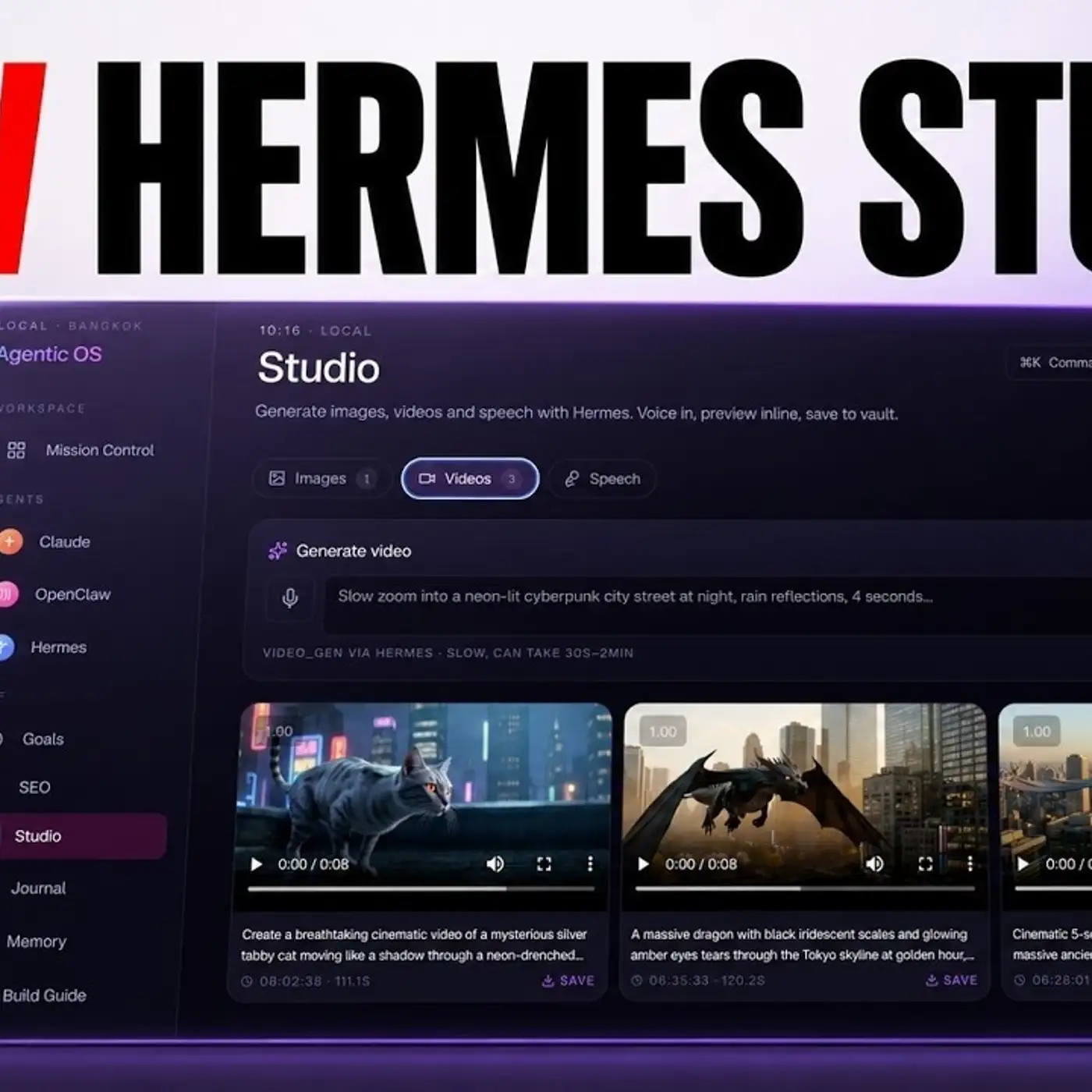
We've got a main workspace with our sole MD files, all of our videos that we've created, everything set up right here with even, and this is what I really like about this setup is like, if you wanted to create a video with Hermes agent using some of the skills you've trained it on, well, inside the terminal will be number one, difficult to remember what skills you've created and therefore call them back and number two, difficult to organize and preview what you've built. All right. Very difficult to really see and visualize what you've created. Whereas for example, inside the mission control in agent OS, we can go inside here, type a prompt, click create, and it will actually go off and start creating a video for us.
So here's some examples of different videos that we've built using this whole system and we can preview it. We can check what we've created. We can watch it back. We have everything set up inside a beautiful UI.
So this is one of the biggest differences. The other thing that I would say here is like, you really need a good system for managing your AI agents, simply because if you look, we've got a full memory set up as a knowledge graph that we can preview inside our system. Now, if we go to OpenCore, we go to Hermes agent, we can use that to build better things in the future. Whereas for example, if you're using Hermes agent inside the chat here, you don't really have that visual element to your memories.
You can't really see what you've created. You can't see and look back at what you've built. And the other thing that I like as well is that with the mission control set up here, we can view our agents. We can see what the status of all of them is.
And if we build something with Hermes, we can then use that and adapt it inside OpenCore and so they all link together. Now we've also got the details on our Obsidian vault here. And if we go to the recent section, you can see that this is automatically synced and we can see our memories inside this setup too. So everything is loaded.
Everything is ready to go. We can even use cloud code for free inside this setup too. You know, that can generate images. It can create videos as well using this whole setup.
So really powerful system. Now, if you compare the old way versus the new way, you know, the old way was having everything in one terminal, you know, four different tabs, four different terminals, et cetera. And then you've got every agent just starting cold. Like 20% of every prompt is you just re-explaining your context.
Additionally, everything that you create, if you're doing inside the terminal here, everything you create just kind of disappears, right? The stuff that I've created inside the terminal with Hermes agent, I just can't preview anymore. I can't see anymore. And that's simply because it's very difficult to manage everything.
Like where are all your files? Where are all the apps you've built? And so how do you recollect it? You can't, right?
Also, the other thing I would say here is there's no persistent memory history across everything. So if I go into ChatGPT or I go into Cloud in a different tab, well, how do I have the memory connected? It's very difficult to do that. Whereas if you have an agent operating system that's running locally, it's also connected locally to your memory systems that help you build and automate anything as well.
The other thing I would say here is this is a constantly evolving system. So for example, if you have a look at everything that we've built here, we just add and layer new things in. So for example, if you look at Hermes, Minimax M3 just came out very recently, we plugged it into this system within hours of the announcement. And I can do that very quickly.
And so you can adapt and evolve your agent operating system based on what you want to have. So for example, if I do a lot of SEO, I'm going to add an SEO system inside it, which you can see right here, right? If I do a lot of video, great, let's create a video agent. And so you can add in new workflows and new systems and new setups.
And the cool thing about this is you can share it with a community. You can share what you've built. You can have different customizations inside your own agent operating system and just really make it your own, which we like as well, you know, you can customize effort. And that's something we've done with loads of people inside my communities just to help them really like set up their own sort of custom AI dashboard automates every single element of all of their workflows.
The other thing I like it too, is like, if we, for example, see the anti-gravity CLI comes out for sure. We're going to set that up inside the agent operating system too. And then we can plug in our goals. We can add a daily journal in here.
We can have the Kanban board orchestrating all of our agents together. And we have a build guide here too. So I can look back on reflect on this in terms of how have I built everything out together, which is great. Also, this kind of synced two ways.
So if you look at Hermes agent, for example, when we're using this, we can switch between different modes, right? So we can use goal mode, which allows Hermes agent to run for hours autonomously without us. We can also use a chat. We can have a look through the workspace.
We've got the MCPs in the control room, right? And so if there's any sort of element or new layer that comes out to Hermes agent, like for example, last week they brought out the MCP connection where you can easily install MCPs, we can just set it up in hours. So that's what I love about this whole system. Whereas for example, you know, the old way with eight tabs open and no memory.
Wow. I'm glad I don't have to do that anymore. Now, when you're doing an agent operating system like this one, basically the cool thing about this too, is that you've got one dashboard and every agent connects inside one sidebar. So we've got all of our agents here.
Additionally, we've got the obsidian memory layer. So every agent reads your business, your clients, your voice, every session. Then you've got the workspace tab where you can view everything that you've previously created. And you've also got persistent history per agent.
So for example, if we go inside the chat here, we can scroll up and see everything that we've created previously, which is awesome. And you can also plug in a free API into something like this. So for example, our alpha on OpenRooter is a free API. You can plug it in.
Minimax with Olama in the cloud is free up to certain token limits as well, which is pretty cool. And then you can actually change different agents depending on what you're doing. The result is you just have an agent operating system that gets smarter every day you use it, and that's the power of all this stuff. So that's basically the power of an agent operating system.
Why Hermes agent OS is so powerful, how to use it, how to set up the benefits. Why it's so much better. Literally, you're going to get 10 times more out of your agents by doing something like this, instead of relying on the old way, if you want to get my setup, you can get it inside the AI profit board. And if you go to the classroom here, we've got the full setup tutorial, the video guide step-by-step.
And we've also got the files that you can load as a zip file to install this. You can also ask questions inside the community daily. And with the community, what we actually do is we create video tutorials for you based on the new stuff that comes out. And additionally, you can jump on weekly coaching calls.
You get four coaching calls a week where you can ask questions, get help and support in real time. Inside the map, you can actually meet people in your local city who are using AI agents like you. And this is all inside the AI profit boarding link in the comments description, or just go to the AIprofitboarding.com to get access to it. Thanks for watching.
More episodes